
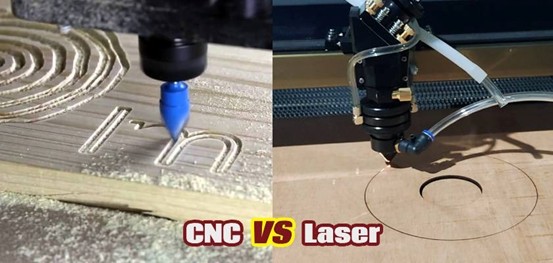
A CNC laser cutter for wood combines computer-controlled motion with a focused laser beam to turn a digital drawing into a physical part. Unlike a router, the laser does not need a cutting bit to contact the material. The cutting head follows programmed paths while the beam removes material along the design.
For engineers, makers, and technical hobbyists, the interesting part is not simply that a laser can cut wood. It is how software, motion control, optics, airflow, and material parameters work together as one automated system.
Table of Contents
What Is a CNC Laser Cutter for Wood?
A CNC laser cutter for wood is a computer-controlled machine designed to cut or engrave wooden materials according to digital instructions. The machine typically contains a laser source, motion system, focusing optics, worktable, controller, air-assist system, and exhaust system.
The workflow can be simplified into five stages:
- Create or import a digital drawing.
- Convert the drawing into machine instructions.
- Move the laser head along the programmed path.
- Apply the required laser power and speed.
- Remove smoke and heat through air assist and exhaust.
This makes laser cutting fundamentally different from manual woodworking. Once the design and parameters have been validated, the same geometry can be reproduced repeatedly without manually measuring every part.
How Does the Laser Cutting Process Work?
The process starts with a vector or raster design. Vector paths are commonly used for cutting because the machine can follow the geometry as a defined path. Raster data can be used for engraving, where the laser scans across a surface to create shades, text, or images.
The controller coordinates two major variables: movement and laser output.
When the cutting head moves quickly, the material receives less energy per unit length. When the machine slows down or increases power, more energy reaches the wood. The correct combination depends on wood species, thickness, moisture, density, and the desired edge quality.
A simplified control chain looks like this:
Digital Design → CAM/Control Software → Motion Controller → Motors + Laser → Wood Part
The controller is therefore important. Accurate positioning alone is not enough; the laser must also be synchronized with movement so that corners, curves, holes, and small features receive consistent energy.
Hardware Components You Should Understand
A practical laser cutting system can be divided into several functional modules.
| Component | Main Function | Why It Matters |
| Laser source | Generates the cutting beam | Determines available processing capability |
| Mirrors and optics | Guide and focus the beam | Affect beam delivery and cutting precision |
| Motion system | Moves the laser head | Controls path accuracy and repeatability |
| Controller | Executes machine instructions | Synchronizes motion and laser output |
| Air assist | Directs air toward the cutting area | Helps manage heat and cutting debris |
| Exhaust system | Removes smoke and fumes | Keeps the working area cleaner |
| Worktable | Supports the material | Influences airflow and material handling |
| Control software | Converts designs into machine operations | Defines paths, speed, power, and other settings |
For someone coming from embedded systems or electronics, the controller and motion subsystem are especially interesting.
The machine is essentially a coordinated electromechanical system: software defines the desired path, the controller interprets it, motors move the gantry, and the laser is switched or modulated according to the cutting instructions.
Why Use a Laser Instead of a CNC Router?
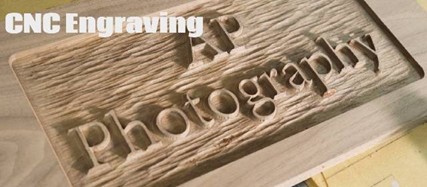
A laser and a CNC router solve some of the same woodworking problems, but they are not identical tools.
A router physically removes material with a rotating cutting tool. It is useful when a project requires deep machining, 3D carving, or certain heavy-duty woodworking operations.
A laser uses concentrated heat and does not physically touch the workpiece. This makes it particularly useful for intricate 2D profiles, small holes, fine patterns, and detailed engraving.
| Requirement | Laser Cutting | CNC Routing |
| Intricate 2D profiles | Very suitable | Suitable |
| Fine engraving | Very suitable | Suitable |
| 3D carving | Limited | Very suitable |
| Tool contact | No | Yes |
| Tool-bit wear | None | Present |
| Very thick stock | Depends on system and material | Often more suitable |
| Small detailed features | Strong capability | Depends on bit size |
| Edge appearance | Can produce heat-affected edges | Mechanical cutting marks may occur |
The choice should therefore be based on the geometry and production process rather than simply asking which technology is more powerful.
Which Wood Materials Can Be Processed?
Common laser-compatible wood materials include plywood, MDF, bamboo, basswood, hardwood veneers, and various solid woods. However, the material label alone does not determine the cutting result.
Two sheets with the same nominal thickness can behave differently because of density, resin, adhesive layers, moisture, and surface coatings.
Plywood deserves particular attention because its adhesive layers can change how the laser behaves from one sheet to another. MDF can also produce significant smoke and residue, making exhaust and air management important.
Before production, test the actual material you plan to use. A small test grid can reveal whether the selected combination of speed and power produces acceptable cutting and engraving results.
How Laser Power, Speed, and Focus Work Together
One of the most common mistakes is treating laser power as the only important parameter.
Cutting performance is affected by at least three major variables:
- Laser power
- Cutting speed
- Focus position
Increasing power does not automatically produce a better edge. If the speed is too slow, excessive heat can increase charring. If the speed is too high, the beam may not deliver enough energy to cut through the material.
Focus is equally important. The laser beam needs to be concentrated correctly at the work surface for efficient energy transfer.
A useful approach is to create a parameter test before production. Use several speed and power combinations on scrap material, inspect the cut-through result and edge quality, and record the settings that work.
Air Assist and Exhaust Are Part of the Cutting System
Air management is sometimes treated as an accessory, but it has a direct effect on the cutting process.
Air assist can help move smoke and debris away from the cutting zone while supporting more consistent processing. An exhaust system removes smoke generated during cutting and engraving.
These systems also matter for machine maintenance. Smoke and residue can contaminate optics and other machine components if the cutting environment is poorly managed.
For production equipment, the laser source should therefore not be evaluated in isolation. The complete system—including optics, motion, air assist, exhaust, and control software—determines the practical result.
What Should You Look for When Choosing a Machine?
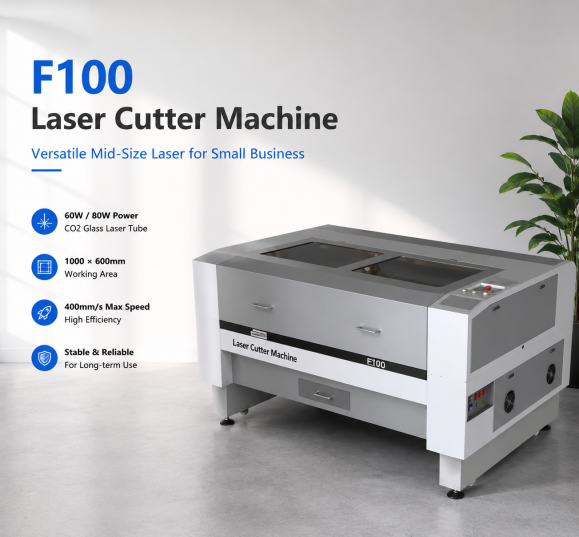
When selecting equipment, start with the application rather than the advertised laser power.
Working Area
Match the bed size to the largest material or component you expect to process. A small work area may be adequate for signs, ornaments, and prototypes, while larger products can require a larger-format machine.
Material Range
Identify the wood types and thicknesses you actually plan to process. Do not assume that performance on one plywood sheet will automatically transfer to every hardwood or composite board.
Motion Accuracy
Look for a stable motion system and repeatable positioning. This becomes increasingly important when parts contain small holes, tight joints, or intricate patterns.
Production Volume
A hobby workflow and a production workflow have different priorities. If the machine will operate frequently, factors such as automation, material handling, exhaust, maintenance access, and workflow repeatability become more important.
Software Compatibility
Check which design and control software the machine supports. A technically capable machine can still be inconvenient if it does not fit your existing digital workflow.
For businesses that need to process multiple non-metal materials, a CO2 Laser Cutter can also provide a broader production platform than a wood-only solution.
Example Workflow: From CAD File to Wooden Part
Imagine a maker needs to produce 100 identical plywood panels.
First, the design is created in CAD or vector-design software. The dimensions and cutting paths are checked before the file is imported into the laser-control software.
Next, the operator assigns cutting parameters to the paths. A test piece is processed to verify dimensions, edge quality, and cut-through performance.
After the parameters are confirmed, the production material is positioned on the worktable. The controller executes the programmed movement while the laser processes the sheet.
The finished parts can then be inspected for dimensional accuracy and edge quality.
This workflow illustrates one of the main advantages of digital fabrication: the physical production process is closely connected to the digital design.
Common Problems and How to Troubleshoot Them
The Laser Does Not Cut Through
Check material thickness, focus, power, speed, lens condition, and the actual composition of the material. A nominally thin sheet may still be difficult to process if its density or adhesive layers differ.
The Edges Are Heavily Charred
Excessive heat can be caused by unsuitable power-speed settings, insufficient airflow, poor focus, or material characteristics. Run a parameter test rather than simply increasing power.
Small Details Are Missing
Inspect the design path, focus, motion accuracy, and cutting parameters. Very small features may require different settings from large straight cuts.
Smoke Is Accumulating
Check the exhaust path, airflow, and enclosure seals. The exhaust system should be appropriate for the machine and production environment.
Safety Considerations
Wood laser cutting involves heat, smoke, and combustible material, so safety should be designed into the workflow.
Use a properly enclosed machine where appropriate, maintain effective ventilation and exhaust, keep the optics and work area clean, and never leave an active cutting process unattended. Material compatibility should also be verified before processing.
A machine should have appropriate emergency controls and protective systems, and operators should follow the manufacturer’s operating instructions.
Frequently Asked Questions
Can a CNC laser cutter for wood cut plywood?
Yes. CO2 laser systems are commonly used for plywood, but the result depends on plywood construction, thickness, moisture, adhesive layers, laser power, speed, focus, and airflow.
Is a laser cutter better than a CNC router for woodworking?
Neither technology is universally better. Lasers are well suited to detailed 2D cutting and engraving, while routers are useful for deeper machining and 3D carving. The right choice depends on the intended parts and process.
Does higher laser power always mean faster cutting?
Not necessarily. Power is only one part of the process. Material properties, focus, speed, airflow, optics, and machine configuration also affect cutting performance.
Can the same machine cut and engrave wood?
Yes. A suitable laser system can perform both operations by changing the programmed path and processing parameters. Cutting removes material through the sheet, while engraving removes or darkens material on the surface.
What should I test before starting production?
Test the actual material, thickness, focus position, power, speed, and airflow. Check both cut-through performance and edge appearance before committing a full sheet to production.
Conclusion
A CNC laser cutter for wood is more than a laser mounted on a moving frame. It is an integrated digital manufacturing system that combines software, motion control, optics, laser output, airflow, and material handling.
Understanding these subsystems makes it easier to select equipment and troubleshoot cutting problems. Instead of choosing a machine from laser wattage alone, evaluate the complete workflow: material, working area, motion performance, control software, exhaust, production volume, and required finish.
For anyone building a woodworking, maker, or small-scale manufacturing workflow, this system-level approach can turn laser cutting from a trial-and-error process into a repeatable digital fabrication method.
Website:www.mimowork-laser.com
Mimowork:https://www.mimowork-laser.com/about-us
Office: Shanghai and Dongguan, China
Email: info@mimowork-laser.com
You can also read the below tutorials.

Embedded Software | Firmware | Linux Devic Driver | RTOS
Hi, I am a tech blogger and an Embedded Engineer. I am always eager to learn and explore tech-related concepts. And also, I wanted to share my knowledge with everyone in a more straightforward way with easy practical examples. I strongly believe that learning by doing is more powerful than just learning by reading. I love to do experiments. If you want to help or support me on my journey, consider sharing my articles, or Buy me a Coffee! Thank you for reading my blog! Happy learning!
Share this:

Discover more from EmbeTronicX
Subscribe to get the latest posts sent to your email.